


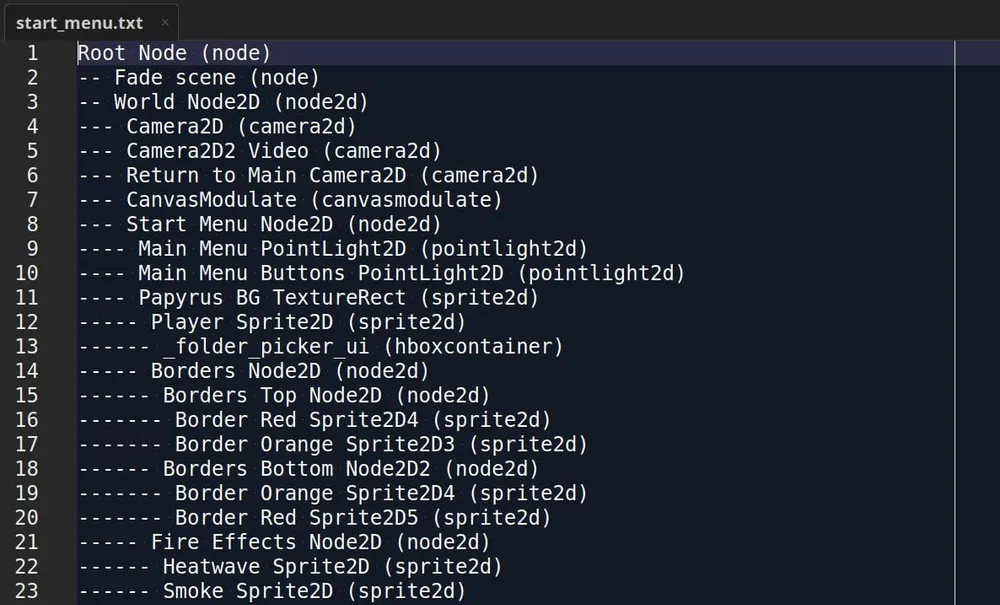
It can be helpful to have a map of your complicated scene node tree; get it in a text file!
We previously shared our dev tool that prints instanced scenes in the output for troubleshooting purposes but what if you don't want temporal information? This gdscript tool will print a text file map of you scene's tree to your desktop location (tested on Kubuntu Linux) using your active scene's name as the filename. Just attached it to a Node type node and set the options as you see fit. You can save it inside your project folder as an alternative to your operating system desktop location or just print it in the output logger instead of saving the file.
The text file will denote the indention of the children nodes as well as showing you the node type in parenthesis. This is a free GPLv3 gdscript.
extends Node

@export var enabled: bool = false
@export var save_file_on_desktop: bool = false
@export_dir var save_in_project_directory: String = ""
@export var print_to_output: bool = false

var _is_windows: bool = OS.get_name() == "Windows"
var _sep: String = "\\" if _is_windows else "/"

func _gather(node: Node, level: int = 0) -> Array:
	var lines: Array = []
	var prefix: String = "" if level == 0 else String("-").repeat(level + 1) + " "
	lines.append(prefix + node.name + " (" + node.get_class().to_lower() + ")")
	for child in node.get_children():
		if child is Node:
			lines += _gather(child, level + 1)
	return lines

func _desktop_path() -> String:
	if _is_windows:
		return OS.get_environment("USERPROFILE") + "\\Desktop"
	return OS.get_environment("HOME") + "/Desktop"

func _full_path(dir: String, file: String) -> String:
	var dir_final := dir
	if dir_final == "":
		dir_final = _desktop_path()
	if dir_final.ends_with(_sep):
		return dir_final + file
	return dir_final + _sep + file

func _scene_based_filename() -> String:
	var scene := get_tree().get_current_scene()
	var scene_path: String = ""
	if scene:
		if scene.has_method("get_filename"):
			scene_path = scene.get_filename()
		elif scene.has_method("get_scene_file_path"):
			scene_path = scene.get_scene_file_path()
		elif scene.has_method("get_scene_instance_load_path"):
			scene_path = scene.get_scene_instance_load_path()
	if scene_path != "":
		return scene_path.get_file().get_basename() + ".txt"
	if scene and scene.name != "":
		return scene.name + ".txt"
	return "scene_tree.txt"

func _ready() -> void:
	if not enabled:
		return
	var scene_root: Node = get_tree().get_current_scene() if get_tree().get_current_scene() != null else get_tree().get_root()
	var text: String = "\n".join(_gather(scene_root))
	if print_to_output:
		print(text)
	if save_file_on_desktop:
		var out_filename := _scene_based_filename()
		var path := _full_path(save_in_project_directory, out_filename)
		var f := FileAccess.open(path, FileAccess.ModeFlags.WRITE)
		if f != null:
			f.store_string(text)
			f.close()
			if print_to_output:
				print("Saved scene tree to: " + path)
		else:
			push_error("Failed to open file for writing: " + path)
We have some other more complex Godot tools, scripts plugins and addons on our Itch.io page.
