


A useful tool for troubleshooting any text-base file so its easier to dump into 10,000 character-limited AI models.
We use the Geany IDE for coding purposes. Its a great tool that is fast, powerful and most importantly gets out of the way so you can just focus on work.
Sometimes its helpful to consult certain piloting LLMs for troubleshooting errors and the artificial character limit imposed by Microsoft Copilot is just a dark pattern to force you to login for tracking purposes and likely up-selling later when you reach some arbitrary limit.
This bash script will first, create a temporary file so your original file is 100% safe from changes. Then, the new temp copy file is automatically marked with a commented block every 10,000 characters so its faster for you paste sections of code/text for troubleshooting purposes. This can then be trigged by a shortcut command in Geany using, for us, the execute F5 command, using the Set Build Commands within Geany.
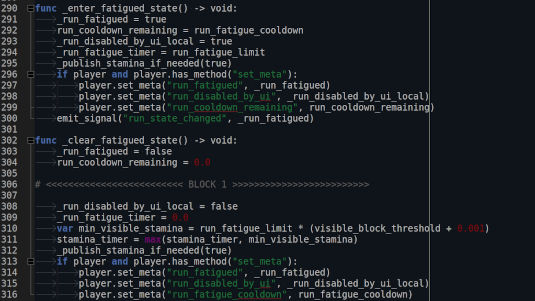
Your temp files on Linux will be automatically removed so there is never an issue with filling memory needlessly. This uses the standard temp policy within the folder.
We just leave the script "MARK_BLOCKS.sh" in the Geany Plugins folder, though obviously not a true plugin.
There are some areas for improvement, such as not leaving extra console windows open but this is mostly just a visual annoyance. Functionally it works well. At one time we also tried to automate the selection and copy to clipboard, up through the block warning section, but that was difficult to get to work consistently.
Save the following code as a .sh file, give it a+x permissions, set your shortcut in Geany.
Note: if you do not use KDE's Konsole, you will likely have change the lines that invoke Konsole to whatever bash/console/terminal program you use on your distro.
#!/usr/bin/env bash
# MARK_BLOCKS.sh
# Writes a marked copy into the user's temp directory (never into the project folder).
# Inserts markers AFTER the line that contains each BLOCK_SIZE boundary.
# Ensures exactly two newlines (\n\n) before and after the marker line.
# Removes only previous markers that match the arrowed BLOCK pattern.
# Opens the marked file with the desktop handler (kioclient5/xdg-open/gio/geany)
# and notifies the user of the written path without opening extra Konsole windows.
# If you explicitly want Konsole to open, set OPEN_IN_KONSOLE=1 in the environment.
# Usage: MARK_BLOCKS.sh /full/path/to/file [block_size]

set -euo pipefail

FILE="${1:-}"
BLOCK_SIZE="${2:-11000}"

if [ -z "$FILE" ] || [ ! -f "$FILE" ]; then
  echo "Usage: MARK_BLOCKS.sh /full/path/to/file [block_size]"
  exit 1
fi

TMPDIR="${TMPDIR:-}"
if [ -z "$TMPDIR" ]; then
  if [ -n "${XDG_RUNTIME_DIR:-}" ]; then
    TMPDIR="$XDG_RUNTIME_DIR"
  else
    TMPDIR="$(python3 -c 'import tempfile,sys; print(tempfile.gettempdir())')"
  fi
fi
TMPDIR="${TMPDIR:-/tmp}"

# Run the marker generator in Python and capture the produced path (only the path is printed)
OUTPATH="$(python3 - "$FILE" "$BLOCK_SIZE" "$TMPDIR" <<'PY'
import sys, re, shutil, subprocess, os, time, tempfile

path = sys.argv[1]
try:
    n = int(sys.argv[2])
except:
    n = 11000
tmpdir = sys.argv[3]

tmpdir = os.path.abspath(os.path.expanduser(tmpdir))
if not os.path.isdir(tmpdir):
    tmpdir = tempfile.gettempdir()

with open(path, "rb") as fh:
    b = fh.read()
try:
    s = b.decode("utf-8")
except Exception:
    s = b.decode("latin1")

ARROW_COUNT = 25
marker_re = re.compile(r'^\s*#\s*<{%d,}\s*BLOCK\s*\d+\s*>{%d,}\s*$' % (ARROW_COUNT, ARROW_COUNT), re.MULTILINE)

lines = s.splitlines(True)
clean_lines = []
for ln in lines:
    if marker_re.match(ln.strip()):
        continue
    clean_lines.append(ln)
clean_text = "".join(clean_lines)

L = len(clean_text)
positions = []
pos = n
while pos < L:
    positions.append(pos)
    pos += n

def make_marker(idx):
    left = "<" * ARROW_COUNT
    right = ">" * ARROW_COUNT
    return f"# {left} BLOCK {idx} {right}"

result_parts = []
last_index = 0
idx = 1

for boundary in positions:
    if boundary >= L:
        break
    next_nl = clean_text.find("\n", boundary)
    if next_nl == -1:
        chunk = clean_text[last_index:]
        chunk = chunk.rstrip("\n")
        result_parts.append(chunk)
        result_parts.append("\n\n" + make_marker(idx) + "\n\n")
        last_index = L
    else:
        cut_pos = next_nl + 1
        chunk = clean_text[last_index:cut_pos]
        chunk = chunk.rstrip("\n")
        result_parts.append(chunk)
        result_parts.append("\n\n" + make_marker(idx) + "\n\n")
        last_index = cut_pos
    idx += 1

if last_index < L:
    result_parts.append(clean_text[last_index:])

newtext = "".join(result_parts)

base = os.path.basename(path)
base = base.replace(os.sep, "_")
ts = int(time.time())
pid = os.getpid()
temp_name = f"{base}.{ts}.{pid}.marked.gd"
outpath = os.path.join(tmpdir, temp_name)

orig_dir = os.path.abspath(os.path.dirname(path))
try:
    if os.path.commonpath([os.path.abspath(outpath), orig_dir]) == orig_dir:
        outpath = os.path.join(tempfile.gettempdir(), temp_name)
except Exception:
    outpath = os.path.join(tempfile.gettempdir(), temp_name)

# atomic write
atomic_tmp = outpath + ".tmp"
with open(atomic_tmp, "w", encoding="utf-8", newline="\n") as f:
    f.write(newtext)
    f.flush()
    try:
        os.fsync(f.fileno())
    except Exception:
        pass
try:
    os.replace(atomic_tmp, outpath)
except Exception:
    try:
        os.rename(atomic_tmp, outpath)
    except Exception:
        pass

try:
    os.sync()
except Exception:
    pass

time.sleep(0.04)

# print absolute path only
print(os.path.abspath(outpath))
PY
)"

# Validate OUTPATH
if [ -z "${OUTPATH:-}" ] || [ ! -f "$OUTPATH" ]; then
  echo "Failed to produce marked file." >&2
  exit 1
fi

# helper: run command detached (no output)
_detach() {
  nohup "$@" >/dev/null 2>&1 &
}

# Try desktop openers in order. Do not run xdg-open inside Konsole.
opened=false

if command -v kioclient5 >/dev/null 2>&1 && [ "$opened" = false ]; then
  _detach kioclient5 exec "$OUTPATH" || true
  opened=true
  sleep 0.04
fi

if command -v xdg-open >/dev/null 2>&1 && [ "$opened" = false ]; then
  _detach xdg-open "$OUTPATH" || true
  opened=true
  sleep 0.04
fi

if command -v gio >/dev/null 2>&1 && [ "$opened" = false ]; then
  _detach gio open "$OUTPATH" || true
  opened=true
  sleep 0.04
fi

if command -v geany >/dev/null 2>&1 && [ "$opened" = false ]; then
  _detach setsid geany "$OUTPATH" || true
  opened=true
  sleep 0.04
fi

# Notify the user without opening a terminal window.
# Prefer kdialog passive popup (KDE), then notify-send, then fallback to printing only.
if command -v kdialog >/dev/null 2>&1; then
  # show a short passive popup (no terminal)
  kdialog --passivepopup "Wrote: $OUTPATH" 5 >/dev/null 2>&1 || true
elif command -v notify-send >/dev/null 2>&1; then
  notify-send "MARK_BLOCKS" "Wrote: $OUTPATH" >/dev/null 2>&1 || true
else
  # last resort: print to stdout (caller sees it)
  printf 'Wrote: %s\n' "$OUTPATH"
fi

# If the user explicitly requested Konsole (OPEN_IN_KONSOLE=1), open a single tab.
# This is opt-in to avoid accidental duplicate terminals.
if [ "${OPEN_IN_KONSOLE:-0}" = "1" ] && command -v konsole >/dev/null 2>&1; then
  # create a tiny script to print the path and drop to shell
  tmp_sh="$(mktemp --suffix=.sh)"
  cat > "$tmp_sh" <<'SH'
#!/usr/bin/env bash
printf 'Wrote: %s\n' "$1"
exec bash
SH
  chmod +x "$tmp_sh"
  # prefer new tab; if not supported, open a window but keep it single
  if konsole --help 2>&1 | grep -q -- '--new-tab'; then
    _detach konsole --new-tab -e "$tmp_sh" "$OUTPATH" || true
  else
    _detach konsole --noclose -e "$tmp_sh" "$OUTPATH" || true
  fi
fi

# Always print the path to stdout for the caller (script output)
printf 'Wrote: %s\n' "$OUTPATH"
