


Need to get a roughly accurate sort of audio files without manually listening to them all? Bash it!
Recently there was a need to sort a dozen audio files (.mp3) by pitch and tonality so they could mixed and permuated into new sound effects for a game project.
These sound effects are controlled by a special gdscript in the Godot game engine where they would use a dynamically created AudioStream2D node, but only per contextual time based upon a cached, auto-saving json export timer, in turn based upon the player's expired time.
In other words, the audio files were similar, but different as a cascade of sounds that played sequentially once X time was reached by the player.
This bash script, in an attempt to be as system agnostic and portable as possible, utilizes ffmpeg to automate this process: analyze audio, sort files, rename in sort order, export file list to spreadhsheet with dynamic updates in the command console.
The script is ran in the same folder where your audio files live and will rank from the highest tone, assigning it with a prepended 000 file name, down through the lowest toned audio file. The original files do not matter; no existing filenames will be altered. However, it will remove any existing 000 naming sequence and the first space if it previously exists so you can easily re-run the script in the same folder after adding more audio files that you want to include in a new group order. Conversely, if a audio file is removed from the folder, re-run the script to fix the entire list again without gaps in the file names.
The results are around 75% accurate if your sound files are remotely similar. In our test we used bell tolling sounds that had some big differences in terms of leading silence, reverb, echo and repeating tolls. Bells are special audio types as they are complex, resonate and are difficult for programs to analyze in any significant meaning vs. a human listener. The more differentiated your audio, the worse this script will likely work but should save some manual sorting and listening if you sound files are somewhat close in DB and other characteristics. YMMV.
A Tab Seperated spreadsheet is also generated during processing so its easy to get a list you can copy into notes or whatever. A log is also generated.
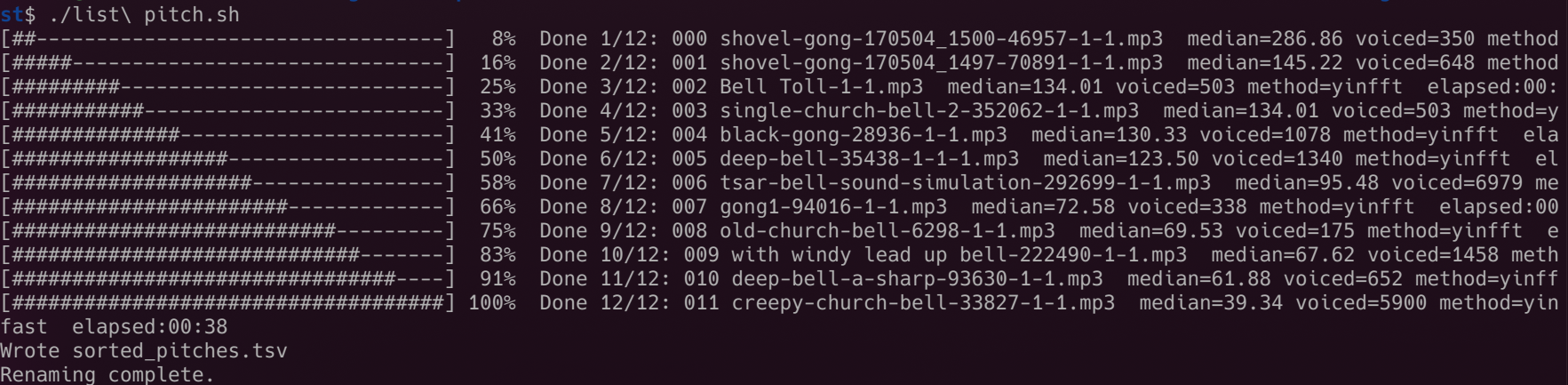 A terminal output of the bash script as it works on the audio files in the same directory as the script.
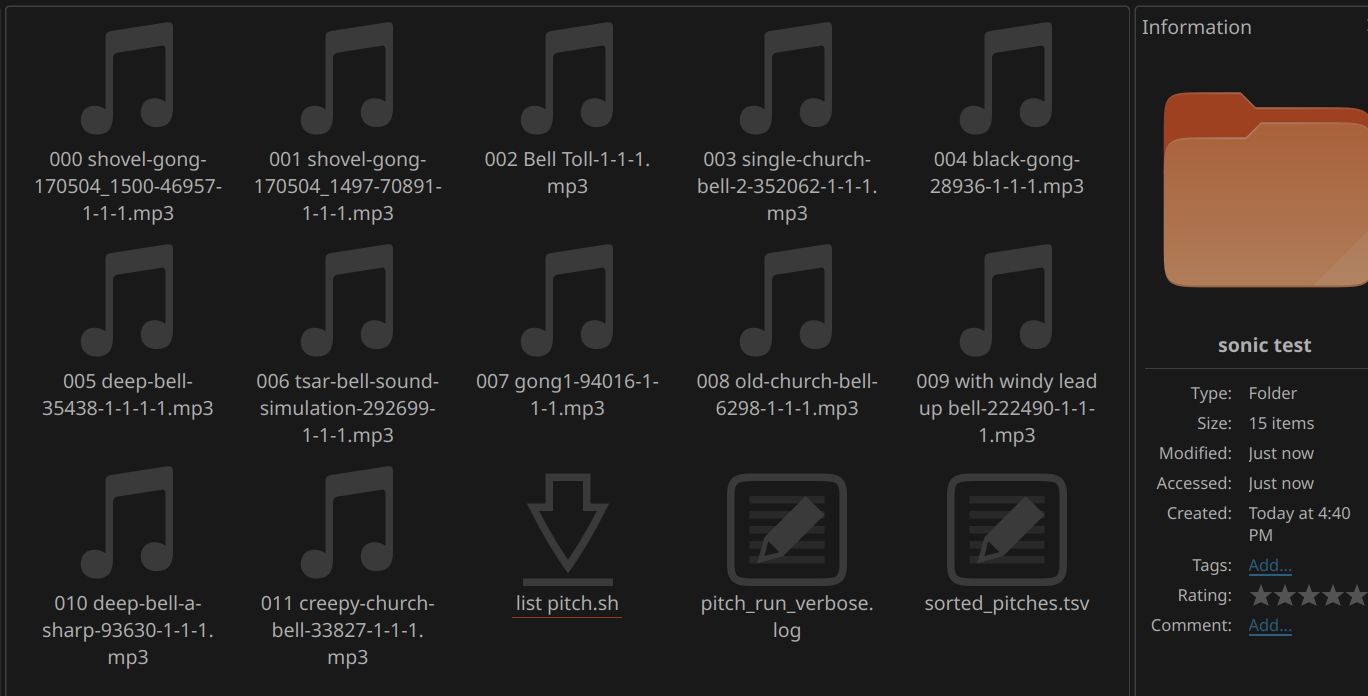 The resulting sorted order of the audio files by tone, along with the .tsv spreadsheet.
Please note this script was heavily edited by Copilot AI in its creation. Tested on Ubuntu Linux 24.04 (specifically with the KDE Plasma desktop) using Konsole terminal. It is advised to make a copy of your audio source files in a new folder to run the script as a precaution; once the script starts there is no pause or undo.
Simply copy the script below and save it into a list pitch.sh text file; be sure to give the script a+x permissions and call it using your terminal console from the same folder (save it in the same place) as your audio files to process.
#!/usr/bin/env bash
set -euo pipefail

ATTACK_TRIM=0.20
SILENCE_DB=-50
SILENCE_DUR=0.05
MIN_VOICED=6
PAD=3
LOGFILE="pitch_run_verbose.log"
OUT_TSV="sorted_pitches.tsv"
METHODS=( "yinfft" "yinfast" "yin" "mcomb" "fcomb" "schmitt" "default" )

OUT_TMP="$(mktemp)"
SORTED_TMP="$(mktemp)"
TMP_PITCH="$(mktemp)"
: > "$LOGFILE"
: > "$OUT_TMP"

for cmd in ffmpeg aubiopitch gawk awk sed date printf tput; do
  command -v "$cmd" >/dev/null 2>&1 || { echo "$cmd not found; install it and re-run." >&2; exit 1; }
done

shopt -s nullglob
mp3s=( *.mp3 )
total=${#mp3s[@]}
if [ "$total" -eq 0 ]; then
  echo "No .mp3 files found in this directory." | tee -a "$LOGFILE"
  exit 1
fi

trap 'rm -f "$OUT_TMP" "$SORTED_TMP" "$TMP_PITCH" 2>/dev/null' EXIT

median_and_count() {
  local pitchfile="$1"
  gawk '
    BEGIN { n=0 }
    {
      val = $(NF)
      if (val+0 > 0) { a[++n] = val+0 }
    }
    END {
      if (n==0) { print "0.00", 0; exit }
      asort(a)
      if (n % 2 == 1) med = a[int(n/2)+1]; else med = (a[n/2] + a[n/2+1]) / 2
      printf "%.2f %d", med, n
    }' "$pitchfile"
}

progress_bar_inline() {
  local pct=$1
  local width=36
  local filled=$(( (pct * width) / 100 ))
  local empty=$(( width - filled ))
  local bar="["
  for ((i=0;i<filled;i++)); do bar+="#"; done
  for ((i=0;i<empty;i++)); do bar+="-"; done
  bar+="] $(printf "%3d" "$pct")%"
  printf "%s" "$bar"
}

format_time() {
  local secs=$1
  local s=$(printf "%.0f" "$secs")
  local h=$((s/3600))
  local m=$(( (s%3600)/60 ))
  local sec=$(( s%60 ))
  if [ "$h" -gt 0 ]; then
    printf "%02d:%02d:%02d" "$h" "$m" "$sec"
  else
    printf "%02d:%02d" "$m" "$sec"
  fi
}

print_line() {
  local text="$1"
  printf '\r\033[K%s' "$text"
  # force a flush
  printf '' >&1
}

start_time=$(date +%s.%N)
processed=0

for f in "${mp3s[@]}"; do
  pct=$(( processed * 100 / total ))
  print_line "$(progress_bar_inline "$pct")  Analyzing $((processed+1))/$total: $f"

  first_non_silent=$(ffmpeg -v error -i "$f" -af "silencedetect=noise=${SILENCE_DB}dB:d=${SILENCE_DUR}" -f null - 2>>"$LOGFILE" | awk '/silence_end/ {print $5; exit} END{print "0.00"}')
  if ! awk "BEGIN{exit(!( $first_non_silent+0 >= 0 ))}"; then
    first_non_silent=0.00
  fi
  analysis_offset=$(awk -v a="$first_non_silent" -v t="$ATTACK_TRIM" 'BEGIN{printf "%.3f", a + t}')

  best_med="0.00"; best_cnt=0; best_method="none"
  method_results_file="$(mktemp)"

  for m in "${METHODS[@]}"; do
    rm -f "${TMP_PITCH}.${m}"
    pct_now=$(( processed * 100 / total ))
    print_line "$(progress_bar_inline "$pct_now")  Analyzing $((processed+1))/$total: $f  method:$m..."

    if [ "$m" = "default" ]; then
      if ! { ffmpeg -v error -ss "$analysis_offset" -i "$f" -f wav - 2>>"$LOGFILE" | aubiopitch - 2>>"$LOGFILE" > "${TMP_PITCH}.${m}"; }; then
        print_line "$(progress_bar_inline "$pct_now")  Analyzing $((processed+1))/$total: $f  method:$m failed"
        continue
      fi
    else
      if ! { ffmpeg -v error -ss "$analysis_offset" -i "$f" -f wav - 2>>"$LOGFILE" | aubiopitch -p "$m" - 2>>"$LOGFILE" > "${TMP_PITCH}.${m}"; }; then
        print_line "$(progress_bar_inline "$pct_now")  Analyzing $((processed+1))/$total: $f  method:$m failed"
        continue
      fi
    fi

    read -r med cnt <<< "$(median_and_count "${TMP_PITCH}.${m}" 2>>"$LOGFILE" || echo "0.00 0")"
    printf "%s,%s,%s\n" "$m" "$med" "$cnt" >> "$method_results_file"

    print_line "$(progress_bar_inline "$pct_now")  Analyzing $((processed+1))/$total: $f  method:$m ok"
  done

  if [ -s "$method_results_file" ]; then
    readarray -t lines < "$method_results_file"
    maxc=0; maxm="none"; maxmed="0.00"
    for line in "${lines[@]}"; do
      mname=$(cut -d, -f1 <<<"$line")
      mmed=$(cut -d, -f2 <<<"$line")
      mcnt=$(cut -d, -f3 <<<"$line")
      if [ "$mcnt" -gt "$maxc" ]; then
        maxc="$mcnt"; maxm="$mname"; maxmed="$mmed"
      fi
    done
    best_method="$maxm"; best_med="$maxmed"; best_cnt="$maxc"
  else
    best_method="none"; best_med="0.00"; best_cnt=0
  fi

  printf "%s,%s,%s,%s\n" "$best_med" "$best_cnt" "$f" "$best_method" >> "$OUT_TMP"
  rm -f "$method_results_file"

  pct_done=$(( processed + 1 ))
  elapsed=$(awk -v s="$start_time" -v n="$(date +%s.%N)" 'BEGIN{printf "%.0f", n - s}')
  print_line "$(progress_bar_inline "$((pct_done*100/total))")  Done $pct_done/$total: $f  median=$best_med voiced=$best_cnt method=$best_method  elapsed:$(format_time "$elapsed")"

  processed=$((processed+1))
done

sort -t, -k1,1nr "$OUT_TMP" > "$SORTED_TMP"
echo -e "Order\tNew File Name" > "$OUT_TSV"

order=0
while IFS=, read -r med cnt fname method; do
  cleaned=$(printf '%s' "$fname" | sed -E 's/^[[:space:]]*([0-9]+[ _-])+//; s/^[[:space:]]+//')
  [ -z "$cleaned" ] && cleaned="$fname"
  prefix=$(printf "%0${PAD}d" "$order")
  newname="${prefix} ${cleaned}"
  if [ -e "$newname" ]; then
    suffix=1
    base="${newname%.*}"
    ext="${newname##*.}"
    while [ -e "${base}-${suffix}.${ext}" ]; do
      suffix=$((suffix+1))
    done
    newname="${base}-${suffix}.${ext}"
  fi
  printf "%d\t%s\n" "$order" "$newname" >> "$OUT_TSV"
  if mv -- "$fname" "$newname"; then
    :
  else
    echo "ERROR renaming $fname -> $newname" | tee -a "$LOGFILE"
  fi
  order=$((order+1))
done < "$SORTED_TMP"

printf '\n'
echo "Wrote $OUT_TSV" | tee -a "$LOGFILE"
echo "Renaming complete." | tee -a "$LOGFILE"
